
They own the model
You own the memory
Everything remembers, Aletha learns · Metamemory for AI
Only on your computer
Your memory is a file on your computer and nowhere else. No server, no cloud, no account.
Smarter memory
Tells facts from guesses and asks when it isn't sure.
Plugs into your AI
Works with the Claude or ChatGPT you already use.
CLOSED BETA · 27.11.26
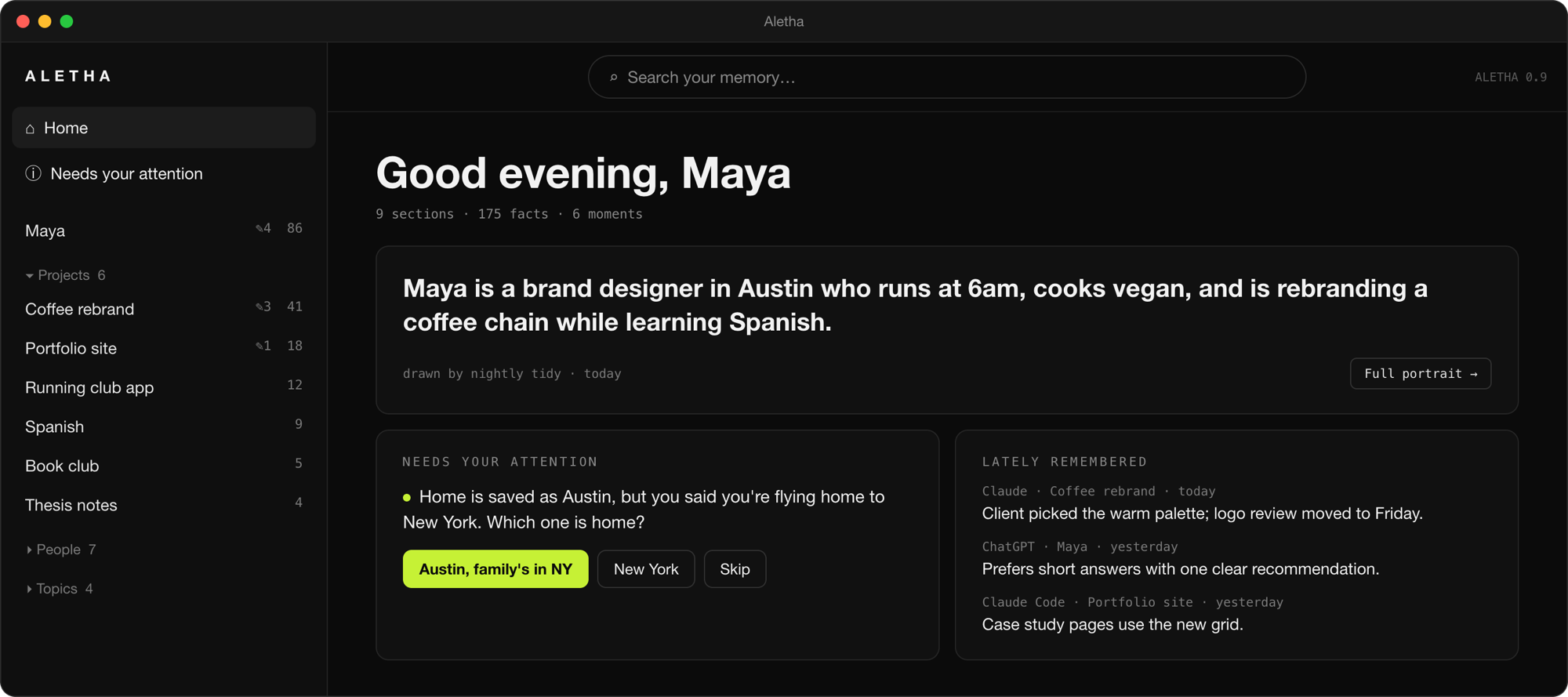
See what your AI knows
A portrait of you, what changed lately, and the one question that needs your answer
How it works
Install the app
Download it and open it. A couple of minutes, no account.
Connect your AI
Pick Claude or ChatGPT during setup. Aletha plugs into them.
Chat as usual
Your AI saves what matters and brings it back in any new chat. When something doesn't add up, it asks.
Look and fix, if you like
Open the app to see what your AI knows about you and fix anything. It's optional: Aletha works even if you never open it.
Stored only on your computer, nothing is ever sent to us
Learns
Correct it once and the mistake stays fixed. The longer you use it, the sharper it gets.
Everywhere
One memory for Claude, Cursor, local models and the API. Switch models, keep everything.
Automatic
Connect once. Nothing to write down or clean up, and no re-explaining yourself in every new chat.
Honest
It knows a guess from a fact, so it makes fewer things up and nods along less.
Yours
It lives on your machine. See what it remembers about you, and fix it.
Questions
How is metamemory different from ordinary memory?
Memory is what you know. Metamemory is what you know about what you know: where it came from, how sure you are, whether it's still true. Most AI memory stores "you told me" and "I guessed" the same way, so it makes things up and gets cluttered over time. Aletha keeps the story of every memory, so it gets sharper instead. Under the hood runs MnemNet, our metamemory engine.
What is it?
Metamemory for AI. Connect it once, and your AI remembers you and your projects in any chat, and gets sharper over time.
Which AI does it work with?
Claude Desktop and Claude Code, ChatGPT, any model through the API, and local models. Cursor by the beta launch.
Can you see my data?
No. There's no Aletha server and no account. Your memory is a file on your computer, and nothing is sent to us, because there's nowhere to send it.
How can I check that?
Your memory sits in one folder on your computer that you can open and look through. Aletha itself goes online only to check for updates and, for its nightly tidy-up, to your own Claude account. Your AI apps talk to their own providers, as they always do. Any network monitor, like LuLu or Little Snitch, will show you exactly that.
How do I remove it?
Delete the app and its memory folder, and nothing is left. There's no copy anywhere else.
Will it slow down my computer?
No. Aletha isn't an AI running on your machine, it's a memory your AI looks things up in. At rest it uses about 50 MB of RAM and almost no CPU. On disk it takes about 1.4 GB, mostly a small model that finds memories by meaning. It adds about 400 tokens to a chat on average, less than a page of text.
What does it run on?
macOS today: one-command install, and the app lands in Applications. Windows support is planned for the beta launch on 27.11. Linux comes later.
Do I have to sort or maintain anything by hand?
No. Aletha writes things down, brings what's relevant into a new chat, and lets go of what's outdated on its own. No scripts, no tags, no folders.
Then what's the app for?
To look and to fix. You get a portrait of what your AI knows about you, a graph of connections, and project cards with status, what changed and what's next. Everything is already grouped by type: people, projects, decisions.
What if it remembers something wrong?
Just tell it in chat, and the mistake won't come back. Or fix it in the app.
Can I import my old chats?
Yes, with your own API key: your history goes to that model provider for processing, like a normal chat. Import through our server comes later; it will be encrypted in transit, and we'll keep nothing after processing.
Does the model see my memory?
Partly, yes. With Claude or GPT, the memories it needs are sent to the model along with your message, like anything you type. It's fully private only with a local model.
What if I switch models?
Your memory stays with you. The new model starts already in context.
What if I use several agents?
They share what they know about you and your projects. Each agent keeps its own notes separately.
What language is it in?
The early beta is in English. By November 27 you'll be able to choose the memory language at install.
How much does it cost?
The beta is free. The basic local version will stay free; paid plans will cover conveniences like syncing across devices.
How do I get in?
Join the waitlist above. The beta opens on 27.11.26, in waves.